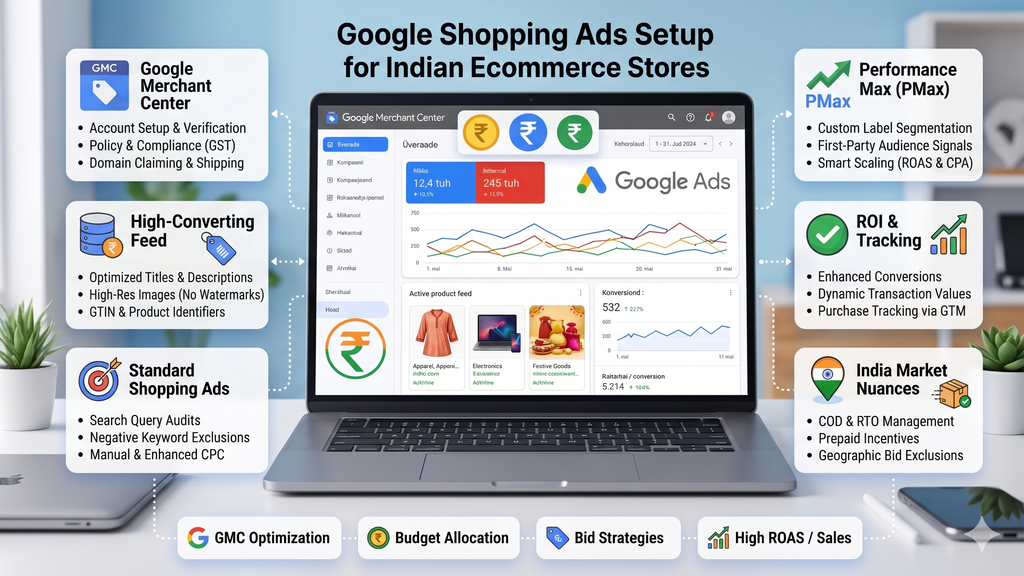
Before you decide, it helps to understand how Google Ads Setup for Ecommerce works in practice and what it means for you.
Google Shopping (and Performance Max / Free Product Listings) offers Indian direct-to-consumer (D2C) brands significant scale because shoppers see your image, price, and brand name before clicking. If they click, they already possess commercial intent.
However, many Indian stores bleed money or face account suspensions due to preventable mistakes. Below is an operational, field-tested guide to configure Google Shopping ads to drive profitable sales.
Step 1: Pre-Setup Website Compliance (Avoid the “Misrepresentation” Trap)
Before touching Google Merchant Center (GMC), align your store policies. Google’s review algorithm scrutinizes Indian stores closely for compliance:
- Legal Information: Provide a full physical address, registered company name, active phone number, and a branded support email (e.g.,
support@yourdomain.com) in your footer and Contact Us page. - Pricing & GST: Google requires inclusive pricing for India. The price on your landing page and checkout must match the feed exactly and include GST. Never surprise shoppers with hidden taxes at final checkout.
- Policies: Publish transparent Return/Refund, Shipping, Terms of Service, and Privacy Policy links in both your header and footer. Specify realistic delivery timeframes (e.g., “Delivered across India in 3–6 business days”).
Step 2: Google Merchant Center (GMC) Setup
- Create and Claim: Navigate to merchants.google.com and create an account. Set the store country to India and currency to INR. Verify and claim your website domain via Google Tag Manager or HTML tag.
- Shipping & Tax Settings:
- Tax: Leave empty (India does not use US-style tax tables in GMC; taxes are embedded in product prices).
- Shipping: Configure flat shipping rates, free shipping thresholds (e.g., Free above ₹999), or weight-based tables matching your on-site checkout.
Step 3: High-Converting Product Feed Optimization
Shopping ads do not use manual keywords; your feed is your SEO.
- Title Formula: Google indexes product titles from left to right.
-
- Formula:
Brand + Core Product Name + Gender/Use Case + Key Feature + Color/Size/Material - Example: “UrbanFit Men’s Pure Linen Oversized Casual Shirt – Olive Green (L)” (Not just “Casual Shirt”).
- Formula:
- Product Identifiers: If you sell branded or manufactured goods with barcodes, submit real
GTIN(EAN/UPC) values. For proprietary custom goods, setidentifier_existstonoto avoid disapproval. - Image Standards: Use clean, high-resolution product photography (minimum 1500 × 1500 px) against a pure white or clean lifestyle background. Avoid promo badges (“Flat 50% Off”, COD Available), watermarks, or border graphics, as these trigger automated disapprovals.
Step 4: Tracking Setup (The Engine Room)
- Enhanced Conversions: Enable Enhanced Conversions in Google Ads. It captures hashed first-party customer data (email/phone) at checkout, restoring conversion signals lost to browser tracking restrictions.
- Purchase Value Tracking: Ensure dynamic transaction values and currency (
INR) fire correctly on yourthank_youpage.
Step 5: Campaign Architecture & Bidding Strategy for India
Phase 1: Launch with Standard Shopping (Validation)
Start with a Standard Shopping Campaign using Manual CPC with Enhanced CPC or Maximize Clicks with a max CPC cap (e.g., ₹8 to ₹18 per click depending on niche).
- Standard Shopping allows you to audit the Search Terms Report.
- Check the search queries daily. Add negative keywords aggressively for search terms that eat budget without generating sales (e.g., “free”, “wholesale”, “repair”, “images”, or unrelated competitor names).
Phase 2: Scale with Performance Max (PMax)
Once you register 25–30 stable conversions in a month, launch a Performance Max campaign alongside or in place of Standard Shopping:
- Custom Labels for Segmented ROAS: Don’t throw all SKUs into one bucket. In GMC, use
custom_label_0to segment your catalog:Top_Sellers(Higher budget allocation, target ROAS 350–500%)High_Margin(Aggressive bidding)Clearance / Low Margin(Conservative target ROAS)
- Audience Signals: Provide warm signals (GA4 180-day purchasers list, remarketing lists, high-intent custom search terms).
Step 6: Critical India Market Nuances
- Cash on Delivery (COD) & RTO: Google will drive volume, but in India, high COD orders often cause higher Return to Origin (RTO). Counteract this on-site by integrating address-validation APIs (Shiprocket, Blitz, or GoKwik) and incentivizing prepaid orders (e.g., “Get 5% Instant Discount on UPI”) to protect net margins.
- Geographic Bid Exclusions: Check your shipping data monthly. If deliveries to specific Tier 3 PIN codes or specific regions result in 60%+ RTO, exclude those locations from campaign location targeting.
Maintain consistent feed hygiene, keep product prices synchronized, and direct spend primarily toward proven margin-makers.
Phone: +918618112263